WizTree: A Powerful Tool for Analyzing Disk Space
Introduction to WizTree
Managing storage space on a computer can sometimes be challenging, especially when the hard drive starts filling up without a clear reason. Many users struggle to identify which files or folders are taking up the most space. This is where wiztree becomes a very useful tool. WizTree is a disk space analyzer designed to help users quickly find large files and folders on their computer.
With the increasing amount of data stored on computers, efficient storage management has become more important than ever. From personal photos and videos to software files and documents, storage can fill up quickly. Wiztree helps solve this problem by scanning the hard drive and showing users exactly where their disk space is being used.
Unlike many traditional disk analyzers, wiztree is known for its extremely fast scanning speed. It can analyze a drive within seconds and display a detailed overview of file sizes. This allows users to identify unnecessary files and free up valuable storage space.
What is WizTree
Wiztree is a disk space analysis software that helps users visualize how storage space is used on their computer. The program scans a hard drive and creates a detailed list of files and folders sorted by size. This makes it easy to see which files occupy the most space.
The software reads the Master File Table of NTFS drives to gather information about files and directories. Because of this method, wiztree can perform scans much faster than many other disk analysis tools. Users can quickly get a clear picture of their storage usage without waiting for long scanning processes.
Wiztree is commonly used by both regular computer users and IT professionals who need to manage storage efficiently. It is especially helpful when a computer runs out of disk space and the user needs to locate large or unnecessary files quickly.
Key Features of WizTree
Wiztree includes several features that make it a powerful tool for disk space management. One of the most notable features is its extremely fast scanning capability. The program can analyze large hard drives in just a few seconds.
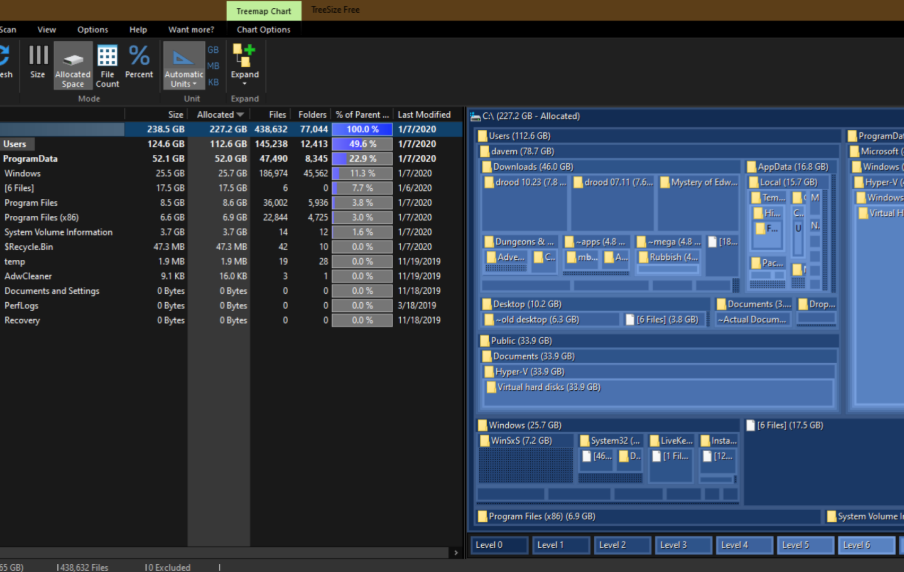
Another important feature is the visual representation of storage usage. Wiztree displays a graphical map that shows how different files and folders occupy space on the drive. Larger files appear as bigger blocks in the map, making them easy to identify.
The software also provides detailed file information. Users can view file sizes, file paths, and folder structures directly within the program. This helps them locate files quickly and decide whether they should be deleted or moved.
Wiztree also allows users to search for specific file types. For example, someone can search for large video files or temporary files that may be consuming unnecessary space.
How WizTree Works
Wiztree works by scanning the file system of a computer’s storage drive. Instead of reading every file individually, it accesses the Master File Table on NTFS drives. This table contains information about all files stored on the drive.
By reading this table, wiztree quickly gathers data about file sizes and folder structures. Once the scan is complete, the program organizes the data into an easy-to-understand format. Users can then explore the file list and visual map to see how their disk space is being used.
The interface is designed to be simple and user friendly. After running a scan, users can click on any folder or file to view more details. This allows them to locate large files within seconds and manage their storage more effectively.
Benefits of Using WizTree
Using wiztree offers many advantages for computer users. One of the biggest benefits is speed. Because the program uses advanced scanning techniques, it can analyze drives much faster than many similar tools.
Another advantage is clarity. The visual map and organized file list make it easy to understand how disk space is distributed. Even users with limited technical knowledge can quickly identify large files and folders.
Wiztree also helps improve system performance. When a hard drive becomes too full, the computer may slow down. By identifying and removing unnecessary files, users can free up space and maintain better performance.
Additionally, wiztree is useful for managing large data collections. Users who store many videos, images, or software files can use the tool to organize and manage their storage more efficiently.
Common Uses of WizTree
Many people use wiztree for different purposes related to disk management. One common use is locating large files that occupy significant storage space. These files may include old videos, downloaded files, or unused software.
Another common use is cleaning up temporary files and system clutter. Over time, computers accumulate temporary files that are no longer needed. Wiztree helps users find these files so they can remove them safely.
IT professionals also use wiztree when troubleshooting storage issues. If a server or computer suddenly runs out of space, the tool can quickly identify which files are responsible.
The program is also useful for organizing personal data. Users can review their storage usage and decide which files should be kept, moved to external drives, or deleted.
Advantages of WizTree Compared to Other Tools
There are many disk space analysis tools available, but wiztree stands out for several reasons. One of the main advantages is its scanning speed. Because it reads the Master File Table directly, the analysis process is much faster than tools that scan files individually.
Another advantage is the intuitive interface. The software presents information in a clear and organized manner, making it easy for users to navigate and understand their storage usage.
Wiztree also provides a powerful visualization feature known as the treemap. This graphical display shows how space is distributed across files and folders. Users can quickly identify the largest files by looking at the largest blocks in the map.
Additionally, the software allows users to export scan results for further analysis. This feature can be useful for IT professionals who need to generate reports about disk usage.
Tips for Using WizTree Effectively
To get the most benefit from wiztree, users should run regular scans of their storage drives. This helps identify large files before they cause storage problems.
It is also helpful to review downloaded files and media folders. These locations often contain large files that may no longer be needed.
Users should be cautious when deleting system files. While wiztree can identify large files, some of them may be necessary for the operating system. It is always important to confirm the purpose of a file before removing it.
Organizing files into folders can also improve storage management. After identifying large files, users can move them to external storage devices if they are not needed frequently.
Conclusion
Wiztree is a powerful and efficient tool designed to help users understand how their disk space is being used. By providing fast scanning and clear visualizations, it allows users to quickly identify large files and manage their storage more effectively.
Whether someone is trying to free up disk space, organize files, or troubleshoot storage issues, wiztree offers a simple and reliable solution. Its speed, user-friendly interface, and detailed analysis make it one of the most useful disk space analyzer tools available for modern computer users.